
Overview | Detail | OA submission workflow | Publisher Docs | Contacts
About the SCELC ACS Agreement
These open access agreements enable authors at 52 participating institutions to publish articles using an open access license in all 70 hybrid ACS journals at no cost to the author and no additional cost to your library. Fully open access journals are excluded from coverage.
Overview
What is the author's cost to publish open access?
| Hybrid Journals | $0 (the APC is covered at no additional cost to the library) |
| Fully OA Journals | $0 - $3500 depending on the journal (No agreement discount) [See "Other fully OA journals" for no-cost sponsored journals] |
Which journals are included?
- 70 included and 20 excluded titles (Updated January 2026)
Effective Dates: Articles accepted between Jan 1, 2026 and December 31, 2028
Agreement detail for authors
| Eligible Authors | Corresponding authors that indicate a participating institution as their primary affiliation when they submit the article for publishing |
| Eligible article types | Peer-reviewed content, with the caviat that "Article types vary by journal and eligibility is determined by journal editorial staff" |
| Journal Publishing Agreement (JPA) |
Preview (Form 3) If your article is accepted and you choose to publish open access, you will need to sign the JPA which allows you to retain copyright and grants ACS license to publish your article. |
| Creative Commons reuse licenses available |
CC BY or CC BY NC-ND Following signature of the JPA, you will be guided to select a public reuse license for your article. Public licenses allow broad access. The NC-ND license restricts commercial use and derivative works. |
| Automatic Article Deposit | Authors who elect to publish open access will automatically have their final published article sent for deposit in PubMed Central. |
Hybrid OA Publishing Submission Workflow
- Submit your article to the ACS hybrid journal of your choice, making sure you are the submitting corresponding author.
- Ensure your institution affiliation is correct on your profile in the ACS Publishing Center.
- Check that your affiliation is stated in the body of the manuscript as the corresponding author’s affiliation.
- When your manuscript has been accepted for publication, you will be automatically prompted with the option to publish open access under your institution’s agreement.
- Confirm that “Yes, I wish to publish open access as per the agreement” is checked, and complete the Journal Publishing Agreement (see preview of Form 3).
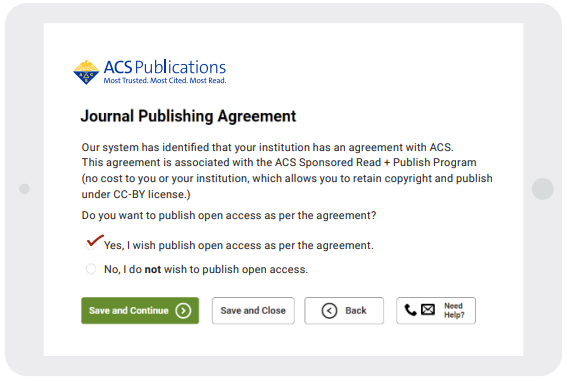
- You’ll be presented with an “Order Open Access” button after completing the Journal Publishing Agreement. Click this button to proceed.
- A new window will open, displaying your manuscript information in the Copyright Clearance Center RightsLink® system. Click on the “Seek Funding” button, then “Next”.
- Select your Creative Commons license type (please confirm that your chosen license type is compliant with your research funder and/or institution’s open access policies before continuing). The ‘Total Charges’ value should read $0, indicating that the costs will be covered by your institution. Click “Next”.
- Provide your name and email address. Click “Next” to review your order.
- Check that your organization is correct, and confirm that the ‘Total Due’ value is $0. Check the consent boxes, and finally click the “Submit Request” button. Your article will be published as ACS open access under your chosen Creative Commons license. There are no charges to pay and no further action required by either you or your institution.
Publisher Documentation
- Look up your institution's ACS agreement description
- Understanding the Journal Publishing Agreement
- ACS Researcher Resources
Contacts
- Email SCELC & Your Library's Author OA Publishing Support oa@scelc.org
- Email ACS OA Author Support OAOps@acs org
- ACS Open Science General Contact Form
Comments
0 comments
Article is closed for comments.